Decision models and a UI glow up

Releval 1.2.0 added AI judges that grade with TypeSafe's Jev. Each judgment comes with a probability for every grade, so you can see where the model hesitated and which judgments might be worth checking. I've found that a handy addition to the usual grade and line of reasoning from a chat model.
OpenAI has since introduced its Decisions API, with GPT-6 Luna able to answer questions in much the same way. Releval 1.3.0 adds support for it, and brings Jev and Luna together under a common model type: decision models.
The other half of this release is the UI, where it's now quicker to get from a metric that moved to the queries and results behind it, and then to try a change of your own.
Chat models and decision models
When you create an AI judge, you can now choose its model type. A chat judge gets a prompt containing the query and one or more results, and writes its reasoning and a grade for each. A decision judge gets a question about one result, with a description of each grade on the evaluation's scale, and returns a probability for every grade. Releval records a grade from those probabilities and keeps the confidence and distribution alongside it.
To use Luna this way, create a judge on an OpenAI provider, choose Decision model, and use gpt-6-luna as the model.
The provider and API key you already use for chat judges also work for OpenAI's decision models.
Luna can be used as either type; the choice on the judge determines how Releval calls it.
A custom provider works as well, if it points at a gateway that implements OpenAI's Decisions API.
Jev and Luna use the same decision question template in Releval, so you can run both against the same relevance criteria without rewriting the template for each provider. Existing judges keep working as they did before: Jev judges become decision judges, and chat judges stay chat judges.
How does Luna do?
I tried Luna against 300 query and result pairs from the Movie Search Ranking Dataset (MSRD), which is where the movies data in Releval's demos comes from. The sample covered 50 queries, each with 3 results labelled relevant and 3 labelled irrelevant by trained crowd workers. The irrelevant ones were results the crowd had been shown for the same query, so they're plausible near misses rather than films picked at random. It's a small sample from one dataset, but enough to see how a judge behaves.
For a reference point, I ran gpt-4.1 as a chat judge over the same pairs, with both judges on their default templates and the 0 to 4 graded scale.
I compared their grades with the crowd's labels using Area Under the Curve (AUC), which measures how well the grades separate relevant results from irrelevant ones; 0.5 is chance, and 1 is a perfect split.
Luna came out at 0.887 and gpt-4.1 at 0.843.
That's a different model as well as a different way of asking, so I wouldn't read it as decision models against chat models.
The two gave the same grade 69% of the time, and were within one grade of each other 96% of the time.
Separating relevant from irrelevant is one thing; agreeing with the crowd on where the line sits is another. On the binary scale, where a judge has to pick a side, Luna agreed with the crowd on about 64% of the pairs. Half the sample is relevant, so a coin toss would manage 50%.
Luna's confidence tracked that agreement: it averaged 0.86 on the judgments that matched the crowd and 0.60 on those that didn't. That's a number to go with the advice in the 1.2.0 post to sample the least confident judgments first, though a confident judgment can still be wrong.
Same franchise, wrong film
Both judges were stricter than the crowd about what counted as relevant. For "watch oceans 8 online", for example, the crowd counted Ocean's Eleven as relevant, while the judges didn't. Ocean's Eleven is in the same franchise as Ocean's 8, but it isn't the film the query asks for.
The default binary criteria say a relevant result "helps with what the query is looking for". Changing that wording to include closely related results raised Luna's agreement with the crowd to 75%. Same model, same results, different definition of relevant. That's the main thing I'd take from this when setting up a judge for your own search. Should another film in the franchise count? What about an accessory when someone searches for the product itself? The template is where you make those choices explicit, and a sample of human judgments helps you check whether the model is applying them as you intended.
A UI glow up
A lot of Releval's UI has grown one feature at a time. This release gives some attention to how those features work together, particularly when you're investigating a change in search quality. Most of it comes down to one idea: fewer dialogs, and the thing you're working on next to what it does.
From a score to the results behind it
The home page used to open with create buttons and a few counts, which didn't say much about how your search was doing. It now leads with your evaluations. Each card shows the headline metric from the latest scored run, its change against the previous run, a trend of recent runs, and how much of the latest run has been judged, so you can see which evaluations need a closer look without opening each one.
On a run's page, a query's results used to expand into the middle of the queries table, and each result opened in a drawer you had to close before opening the next. Now, the queries stay on the left and the selected query's results, request and judgments open on the right, with the run's scores and their change against the previous run at the top. Each result shows the grade used to score it and whether it came from a member, an AI judge or a judgment list. J and K move between queries, so you can work down the list with the keyboard.
The video below follows a run from its scores down to a single result's judgment:
Trying a change in Query Lab
Until this release, the Query Lab ran one version of a query at a time and didn't score it, so working out whether a change had helped meant comparing the results by eye. It now runs a draft query template next to a baseline and scores both with your judgments. Change a boost or add a clause, run the query, and see which results moved and what happened to the metrics.
The Query Lab is still the workbench to a full run's regression test, as I put it when 1.0 came out; a draft can become a full evaluation run when you want to know what it did to the queries you haven't been looking at.
Working on endpoints and templates
Search endpoints and query templates used to be tested in dialogs; both now have pages of their own.
An endpoint's page shows its configuration and the evaluations that use it, with a Test panel alongside. Send a query and inspect the request, the raw response, and the candidates extracted by the mapping, with any existing grades. It also tests an endpoint you're still creating or editing, before you save it. When you're setting one up, this makes it easier to see whether a problem is in the request, the search response or the mapping:
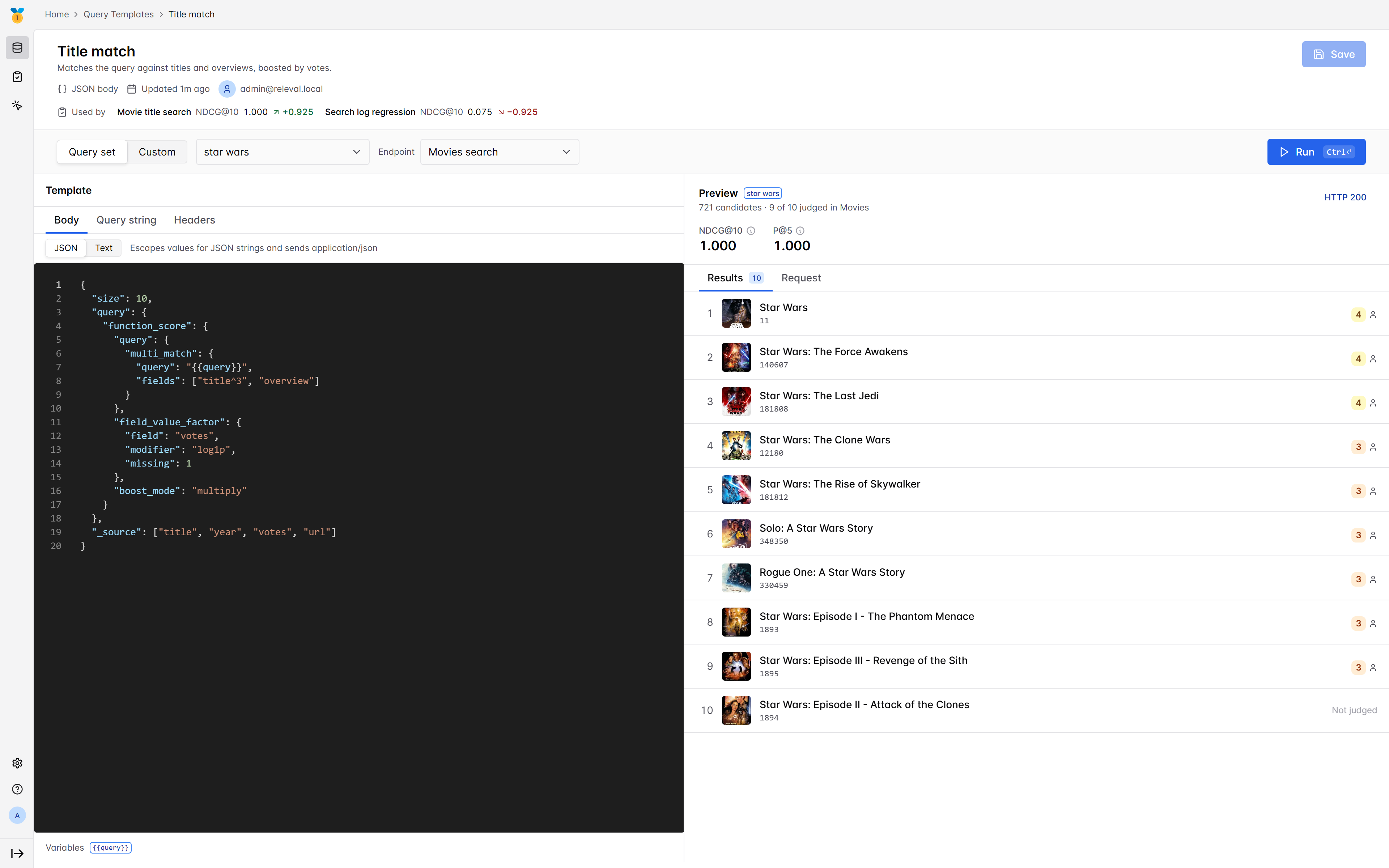
A query template's page has the template on one side and, on the other, the request it renders and the results that come back, with any grades they already have. You can edit the template and run it against a query before saving:
A few smaller things
- Large runs are quicker to score: a run of 1,000 queries now takes about an eighth of the time it did.
- Errors are clearer when a query set, template or mapping can't be read.
The release notes have the full list of fixes.
Upgrading
Back up your database before upgrading, and stop every 1.2.0 instance before starting 1.3.0. The database migrations are forward-only, and the upgraded database can't be used by 1.2.0. For a single instance managed with Docker Compose, the usual upgrade already stops the old container before starting the new one.
The 1.3.0 image also requires x86-64-v2 CPU support. On a virtual machine, check that its CPU configuration exposes that support to the guest. The release notes have the details.
If you point Luna at your own queries, I'd like to hear where its judgments differ from yours, or where the new pages get in your way; the discussions are the best place for either.
Happy ranking!
The movie data and relevance labels in this post come from the Movie Search Ranking Dataset (MSRD) by Metarank, licensed under CC BY-SA 4.0. The Luna test used a sample of 300 of its crowd-labelled pairs, and the demo data shown in the videos and screenshot is adapted from it.