Evaluation results in Slack

Until this release, an evaluation finishing in Releval produced a browser notification for the person who started it. This works well for short, interactive runs, but less well for scheduled or longer-running evaluations. If a run finished later, someone still needed to go back into Releval to see the result.
For many engineering teams, Slack is where day-to-day communication around changes already happens. Pull requests get shared there, deployment results are posted there, and people discuss whether something is ready to ship there. With the release of Releval 1.1.0, evaluation runs and AI judging outcomes can now be sent directly to a Slack channel. Notifications include the resulting metrics and, where available, how each metric changed compared with the previous run.
For example:
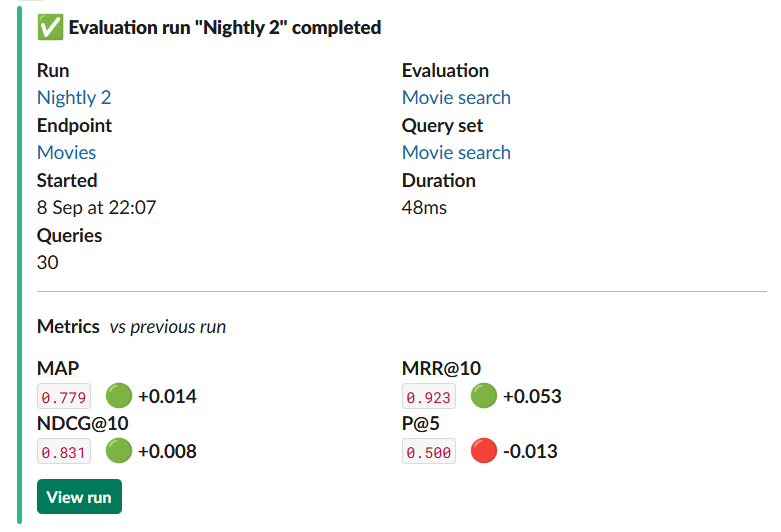
This gives the team some useful context without needing to open Releval each time.
Metrics and changes
A completed evaluation notification includes the evaluation, endpoint and query set, along with the number of queries, run duration and metrics.
Each metric also includes its change against the previous run.
For example:
NDCG@10    0.831    +0.008
MRR@10     0.792    -0.003
Recall@50  0.946    +0.012
The absolute values are useful, but the change is often more immediately relevant when evaluating a ranking update. If NDCG has moved after a change, the notification makes that visible directly in Slack. It still doesn't tell you whether the change was good overall. An aggregate metric can hide improvements and regressions across individual queries, so the notification links back to the evaluation in Releval where the run can be inspected in more detail.
The Slack message is intended to provide a summary, not replace the evaluation views. Here's the full flow:
Configuring Slack Notifications
Check out the Notifications documentation which covers the complete setup.
Another change in Releval 1.1.0 also worth setting is the external Releval URL:
environment:
  - Releval__BaseUrl=https://${RELEVAL_HOST}
This allows the notification to include links back to the relevant evaluation, endpoint, query set and run. The same setting is also used for invitation, email confirmation and password reset links.
Happy ranking!